What is OneDrive?
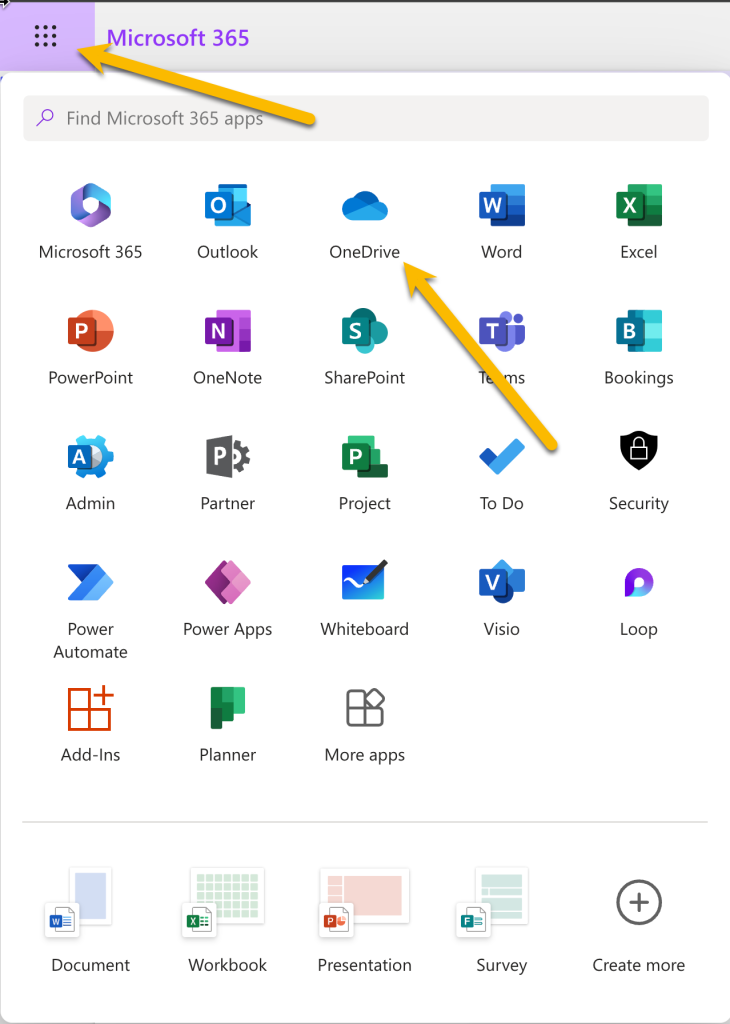
OneDrive is Microsoft’s cloud storage space for files. Go to office.com, login if necessary with your company email address. Then click on the Menu in the upper left, then click on the OneDrive icon.
What is the OneDrive Application on my computer for?
The OneDrive Application synchronizes the files on your local Hard Drive or Solid State Drive with the files in cloud storage.
Do I have to keep all the files from the cloud on my local drive?
No. The OneDrive Application adds a right click menu to files and folders that will allow you to free up space on your local drive, yet still show the folder structure and the file names like they were actually on your local drive. When you access one of these files, the OneDrive Application will seamlessly download the file from the cloud and then open it.
See the section titled “Free up space or have a file always available when offline” here: support.microsoft.com