Clear Browser Cookies
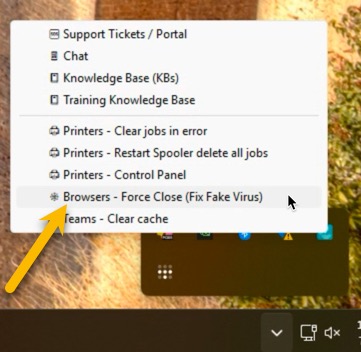
If you need a quick way to clear all your browser cookies. We have added a menu item on our icon. This will close all major browsers (Chrome/Firefox/Edge) and clear their cookies and temporary files. This may take several minutes if you have not cleared things in a while. A popup will appear to let you know when it is done.
You will need to log back in to every website. You will need your passwords or if they are saved in the browser or password manager you will need to use them. This does not erase any saved passwords.
Find the Micro-Ram Icon by the clock in the lower right. It may be hidden under the ^ symbol. Click on “Browsers – Force Close (Fix Fake Virus)”. This clears all your cookies and closes the browsers. By clearing the cookies, it does log you out of every website. It does NOT clear any passwords. It does NOT clear any bookmarks you have saved.
This is also used for closing out your browser windows when you have a fake virus warning. See KB here (coming soon)
You may also do more specific cleaning directly from the browsers.
Firefox – https://support.mozilla.org/en-US/kb/clear-cookies-and-site-data-firefox
Chrome – Coming Soon
Edge – Coming Soon